
When leads come in, someone needs to capture the right information, assign responsibility, follow up, and move the matter forward without delay. Many firms today handle those steps across spreadsheets, email, and memory. Especially with a heavy caseload, cases can fall through the cracks.
We built SmartAdvocate so your intake process lives inside the same system that manages your cases. Here, intake is not a separate function; it is the first step in case management.
What a Manual Law Firm Intake Process Looks Like
Most law firms build intake using a mix of spreadsheets, calendars, notes, and email. The process works, but only if it is maintained consistently. In practice, it usually looks like this:
- Capture lead information: A potential client calls, submits a form, or is referred. Staff collect basic details like contact information, case type, and a short description of the matter, often on paper, in a document or a spreadsheet.
- Enter the lead into a tracking sheet: The lead is added to an Excel spreadsheet or Google Sheet with columns for date, source, case name, case type, status, and notes. This becomes the main list of all incoming matters.
- Track responsibility informally: Leads are assigned through notes, emails, or verbal handoffs. In some firms, one person handles intake. In others, it rotates or goes to whoever is available. Ownership is not always clearly defined.
- Schedule follow-ups manually: Staff rely on calendar reminders, personal to-do lists, or spreadsheet notes to remember to call back, request documents, or move the lead forward.
- Update communication and status: As conversations happen, notes are added manually. Statuses are updated from pending to accepted or rejected. Information is often spread across email threads, documents, and the tracking sheet.
- Convert the lead into a case: If the firm decides to move forward, the intake information is transferred into a case file. This may involve re-entering data into another system or creating a file manually, which can lead to duplicate work or errors when transferring the data or missing details.
Building an Intake Process That Grows With Your Firm
As the number of leads increases, the gaps become harder to manage. What worked with a handful of inquiries starts to break down when your firm is handling dozens of new matters each week.
Without a system that connects intake, follow-up, and case creation, it becomes easier for leads to stall or disappear. Potential clients may look elsewhere if they feel your firm is not following up appropriately. That is when firms begin looking for a way to replace manual intake with a process that holds together under a real workload.
Law Firm Intake Software That Helps You Turn Leads Into Cases
Your intake process starts with how you capture information. In SmartAdvocate, every new matter begins with our user-friendly Intake Wizard, which allows your staff to enter the details of a potential client and generate a structured case file.
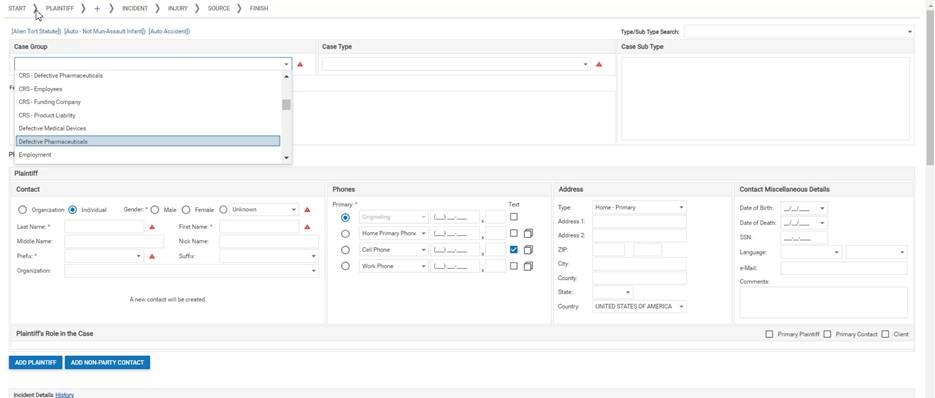
Your firm can control exactly what information is required and what panels are visible based on case type or practice area.
For example, you can require:
- Incident date
- Incident state
- Injury details
- Referral source
You can also control which panels appear during intake, including:
- Defendant information
- Employment details
- Insurance information
- Medical providers
- Vehicles
This helps your team consistently collect the right information from the start, with intake requirements tailored to each case type.
The information entered during intake flows directly into the case file, populating the appropriate sections for defendants, insurance, medical providers, and other case details. This reduces duplicate data entry and makes the information collected during intake available throughout the case.
Managing Leads Before They Become Cases
Not every lead becomes a retained client. That does not mean they should be ignored.
SmartAdvocate treats all matters as cases, even before they are retained. This allows your team to track leads through pre-sign statuses and manage them with the same structure used for active cases.
The Intake Follow Up Dashboard gives your staff a single view of all leads that require attention. From this dashboard, you can:
- See leads assigned to each staff member.
- Filter leads based on time since last contact.
- Update statuses without opening the case.
- Add notes directly from the dashboard.
This keeps your intake process active. Leads are not sitting in an inbox or waiting for someone to remember to follow up.
Assigning Responsibility at Intake
SmartAdvocate allows you to assign staff automatically at intake based on case type. You can designate attorneys, paralegals, or case managers to be assigned as soon as a new case is created. You can also add or remove staff members based on a change in a case’s status. For example, when a case moves from prospect to retained, SmartAdvocate can automatically add an attorney and other staff, perhaps on a rotating basis.
This ensures that every case has a responsible attorney and clear staff assignments from the start and throughout the life of the case. You can also assign teams, allowing you to apply predefined groups of staff to cases in one step. This is useful for firms that operate in pods or practice-specific teams.
When responsibility is assigned immediately, there is no delay between intake and action.
Automating Follow-Up Tasks and Next Steps
Following up with leads is where many intake processes often fail. Someone intends to call back. Someone plans to request documents. The work gets delayed or forgotten. The potential client goes elsewhere.
SmartAdvocate allows you to create WorkPlans that assign tasks automatically.
For example, when a case is created, you can trigger tasks such as:
- Follow up with the client.
- Request medical records.
- Schedule a consultation.
These tasks are assigned to specific roles and include due dates. They appear on the case summary screen and in task dashboards, so your team knows what needs to be done.
A change in a case’s status can also be used to assign tasks to specific roles, with a due date.
You can also apply WorkPlans across multiple cases, allowing you to assign the same intake-related tasks in bulk when needed.
Tracking Tasks, Appointments, and Intake Activity
An intake process involves more than data entry. It involves communication, scheduling, and follow-up.
SmartAdvocate separates these activities into three categories:
- Tasks for work that must be completed.
- Appointments for events such as client meetings, court appearances, or consultations.
- Critical deadlines for legally required dates, including reminders for upcoming deadlines.
These elements are connected to the case and can be viewed together. Your team can see what has been done, what is scheduled, and what is coming next without switching systems.
Structuring Intake Decisions: Reject, Review, or Retain
Every intake process ends with a decision. SmartAdvocate allows you to formalize that decision within the system.
Upon completing intake, your team can choose to:
- Reject the case.
- Move the case to review.
- Retain the case.
Each option triggers a different set of actions.
For rejected cases, you can generate documents and send communication explaining the decision. For retained cases, the system can generate documents and initiate the next steps in the case lifecycle.
This ensures that every lead is handled consistently. There is no ambiguity about whether a case is moving forward.
Scheduling and Managing Client Appointments
Client communication starts during intake. Scheduling consultations and follow-up meetings is a critical part of converting leads into clients.
SmartAdvocate allows your team to:
- Schedule client appointments directly within the system.
- Track those appointments alongside other case activity.
- View appointments on the firm calendar.
Because most appointments are tied to a case, your team can see the full context of each client interaction from within that case’s calendar.
Reporting on Intake Performance and Follow-Up
Without visibility, it is difficult to know whether your intake process is working.
SmartAdvocate allows you to track intake activity through dashboards and reporting tools. You can see:
- Which leads are waiting for follow-up.
- How recently each lead has been contacted.
- Which staff members are responsible for follow-up in each matter.
This gives your firm a way to monitor intake performance and address gaps before they result in lost cases.
Building a Stronger Client Intake Process
A well-organized intake process helps law firms respond to prospective clients, collect important information, and move potential cases forward with greater consistency. By improving communication, assigning clear responsibilities, and automating follow-up tasks, firms can make the most of every opportunity.
SmartAdvocate provides the tools to build a more effective intake process, including:
- Required fields that ensure complete data collection.
- Configurable intake screens tailored to case type.
- Immediate assignment of responsibility.
- Automated tasks for follow-up.
- Centralized tracking of tasks, appointments, and case activity.
- Visibility into all leads and cases through dashboards and reports.
This helps your firm manage more leads while maintaining consistent intake and follow-up practices.
See How SmartAdvocate Supports Your Intake Process
If your firm is relying on manual intake processes or disconnected tools, it becomes harder to track leads and follow up consistently.
When you partner with SmartAdvocate, your intake process becomes part of your case management system. Every lead, every task, and every appointment is connected from the start.
Schedule a Demo to see how SmartAdvocate helps law firms capture important intake information, automate follow-ups, and turn more prospective clients into retained clients.